Yullisa Script: A Handwritten Font for Authentic Branding
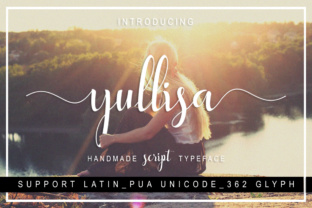
There’s a moment in every creative project when you realize the typography isn’t just carrying the words—it’s carrying the entire personality. I’ve been there, scrolling through font after font, trying to find that one typeface that feels human without looking messy, elegant without being stuffy. That’s exactly where Yullisa Script caught my attention. It’s a handwritten script that manages to feel both personal and polished, which is surprisingly rare in the world of script fonts.
What Makes This Typeface Feel So Approachable
Yullisa Script has a natural, flowing rhythm that mimics real handwriting without the inconsistencies that make some script fonts hard to read. The letterforms have a gentle bounce to them, with smooth connections between characters that create a sense of movement. It doesn’t feel like a font trying to be handwritten—it feels like someone actually sat down with a good pen and wrote with intention. The strokes have just enough variation to feel organic, but not so much that they become distracting or illegible at smaller sizes.
What I appreciate most is the balance it strikes. Some handwritten fonts lean too far into casual territory, making them unsuitable for professional applications. Others overcorrect and lose that warmth entirely. Yullisa Script sits in a sweet spot where you could use it for a wedding invitation and it wouldn’t feel out of place on a product label for a small-batch skincare line. That versatility is what makes it a genuinely useful addition to any designer’s toolkit.
Practical Applications That Actually Work
Let’s talk about where this font shines in real projects. For branding, Yullisa Script works beautifully as a secondary typeface paired with a clean sans serif. Imagine a logo where the business name is set in Yullisa Script and the tagline sits beneath in something like Montserrat or Lato. The contrast creates visual interest while maintaining cohesion. I’ve seen this approach work particularly well for boutique businesses—think bakeries, florists, wedding planners, and lifestyle brands that want to communicate warmth and authenticity.
Packaging design is another area where this script font earns its place. When you’re designing labels for artisan products, the typography needs to feel handmade but not amateurish. Yullisa Script gives you that handcrafted aesthetic while maintaining the consistency required for professional print production. It pairs nicely with serif fonts for product descriptions, creating a hierarchy that guides the eye naturally from the brand name to the details.
Social media graphics are where I’ve found this font to be especially effective. Instagram posts, story templates, and Pinterest pins all benefit from typography that feels personal and engaging. Yullisa Script works well for quote graphics, announcement posts, and any content where you want the text to feel like it was written just for the viewer. Just remember to keep it at sizes where it remains legible—anything below 18px on screen and you’ll start losing readability.
Pairing Strategies for Professional Results
The real magic happens when you start combining Yullisa Script with other typefaces. Here’s what I’ve learned through trial and error: it works best with fonts that have clean, geometric forms. A bold sans serif like Poppins or a classic serif like Playfair Display creates a beautiful contrast that lets the script font stand out without overwhelming the design. Avoid pairing it with other decorative or ornate fonts—two competing personalities in one layout is a recipe for visual chaos.
For editorial layouts and blog headers, try using Yullisa Script for pull quotes or section titles while keeping body text in a highly readable serif or sans serif. This creates natural breaks in the content and adds visual interest without sacrificing the reading experience. The key is restraint—use the script font as an accent, not the foundation. Think of it as the spice in your typographic recipe rather than the main ingredient.
Considering Readability Across Different Mediums
Every script font comes with readability considerations, and Yullisa Script is no exception. On screen, it performs admirably at medium to large sizes, which makes it suitable for headlines, subheadings, and display text. For body copy or extended reading, you’ll want to switch to something more conventional. In print, the font holds up well on quality paper stock, though I’d recommend testing it at your intended size before committing to a large print run. The letter spacing is generally good, but certain letter combinations might need manual kerning adjustments depending on your design software.
One thing worth noting: if you’re using Yullisa Script for logos or brand marks, always test it at multiple sizes. A logo needs to be recognizable whether it’s on a business card or a billboard. Make sure the distinctive character of the font doesn’t get lost when scaled down, and that it doesn’t become overwhelming when scaled up.
Licensing and Practical Considerations
Before incorporating any premium font into commercial projects, always verify the licensing terms. Most quality script fonts, including Yullisa Script, come with specific guidelines about where and how you can use them. Some licenses cover personal and commercial use, while others require separate licenses for different applications—like embedding in digital products versus using on merchandise. Take five minutes to read the license agreement. It’s boring but essential, especially if you’re creating assets for clients or selling products that feature the font.
Also check what’s included in the package. Many modern script fonts come with alternates, ligatures, and stylistic sets that give you more creative control. Yullisa Script may include different versions of certain letters, swashes, or decorative elements that can elevate your designs from good to distinctive. Spend some time exploring the character map in your design software—you might discover options that perfectly suit your project.
Finding the right typeface for a project often feels like searching for a needle in a haystack. But when you find one that aligns with your creative vision and practical needs, it becomes an indispensable part of your design assets. Yullisa Script offers that rare combination of personality and professionalism, making it a worthwhile consideration for anyone working on branding, packaging, digital content, or print materials. The best way to know if it’s right for your work is to test it in context—set your actual headlines, create a mockup, and see how it feels alongside your other design elements. Typography is ultimately about communication, and the right script font should make your message not just seen, but felt.